Full price
Read the full term total
Start with the amount due today. A price divided by months does not change the bill.
Open original PNGPaired media review
Review 145 paired artwork compositions and find their card labels and publication status.
Full price
Start with the amount due today. A price divided by months does not change the bill.
Open original PNG
Full price
Write down each quoted currency and compare same-day converted totals before paying.
Open original PNG
Full price
Check whether the card issuer or payment service adds a separate transaction charge.
Open original PNG
Full price
Compare written totals with the same tax treatment and keep the order summary.
Open original PNG
Full price
Add the separate player charge when the order requires a paid app licence.
Open original PNG
Full price
Divide the full term cost by its duration and keep that number beside the full bill.
Open original PNG
Full price
Ask for the total for your actual simultaneous streams and any separate player fees.
Open original PNG
Full price
A lower first bill can be followed by a different renewal amount. Save both.
Open original PNG
Full price
Check eligible terms, redemption rules and any extra fees before valuing a code.
Open original PNG
Full price
Keep the amount, currency, term and seller together so a later receipt can be reconciled.
Open original PNG
Full price
If living-room and mobile players need separate licences, price each before deciding.
Open original PNG
Full price
Estimate the months when you actually watch before choosing a longer term.
Open original PNG
Full price
A dollar sign alone can refer to several currencies. Look for the three-letter code.
Open original PNG
Full price
On a foreign-currency order, compare the settled payment with the merchant receipt.
Open original PNG
Choosing a term
Use a short commitment while you confirm the device, channel and support path.
Open original PNG
Choosing a term
Start and end the plan around the fixtures that matter to you, after confirming the feed.
Open original PNG
Choosing a term
Check address and network restrictions before buying months that span a move.
Open original PNG
Choosing a term
Count titles you will actually finish before using a year-long offer as the default.
Open original PNG
Choosing a term
Compare the quoted annual total with the shorter terms you expect to use.
Open original PNG
Choosing a term
Ask whether an early renewal extends the existing end date or starts immediately.
Open original PNG
Choosing a term
Confirm the broadcaster and event access before buying a package for a single match.
Open original PNG
Choosing a term
Write down your must-have feed or app while the term is short, then review your choice.
Open original PNG
Choosing a term
Ask if the clock starts at payment, activation or first playback when timing matters.
Open original PNG
Choosing a term
Check account rules and permitted regions for the weeks when you expect to be away.
Open original PNG
Choosing a term
Log your service, player licence and bundle expiry dates as separate entries.
Open original PNG
Choosing a term
Ask how any unused term, new term and price adjustment appear on the next bill.
Open original PNG
Choosing a term
Find out whether a gifted subscription starts immediately or when the receiver redeems it.
Open original PNG
Choosing a term
Test at your usual viewing time, with the device and connection you already plan to use.
Open original PNG
Streams and screens
A registered-device allowance and a concurrent-stream allowance answer different questions.
Open original PNG
Streams and screens
Run two planned streams at the same time when concurrency matters to your household.
Open original PNG
Streams and screens
Find out what profiles can change and which account limits they share.
Open original PNG
Streams and screens
Check the provider’s household and travel rules before buying shared access.
Open original PNG
Streams and screens
Confirm how to remove a retired TV or player from the service account.
Open original PNG
Streams and screens
Look up the exact TV model and regional store before buying access for that screen.
Open original PNG
Streams and screens
Check whether sign-in, audio selection and playback controls work on both devices.
Open original PNG
Streams and screens
Look for the supported title or feed, designated device and connection conditions.
Open original PNG
Streams and screens
Check the content, account, app, TV input and output settings separately.
Open original PNG
Streams and screens
Check actual audio choices and supported formats using your normal setup.
Open original PNG
Streams and screens
Verify subtitle tracks on specific programmes and on the intended app.
Open original PNG
Streams and screens
Caption options can differ between live feeds and catch-up programmes.
Open original PNG
Streams and screens
Use the same permitted source on two players to isolate the viewing controls.
Open original PNG
Streams and screens
Ask how a guest profile or device behaves without sharing private account credentials.
Open original PNG
Streams and screens
Check the exact app’s profile controls, PIN settings and playback restrictions.
Open original PNG
Offers and eligibility
Confirm the charge, eligibility and expiry before activating any trial.
Open original PNG
Offers and eligibility
Read when notice must reach the seller and keep the cancellation confirmation.
Open original PNG
Offers and eligibility
Find out whether a payment method is collected and when it would be charged.
Open original PNG
Offers and eligibility
Confirm whether a trial is available to returning accounts or only new customers.
Open original PNG
Offers and eligibility
Use the trial to test the exact licensed channel or programme you intended to watch.
Open original PNG
Offers and eligibility
Identify the billing party for a direct, bundled or app-store subscription.
Open original PNG
Offers and eligibility
Find out whether each qualifying service or plan has to remain active.
Open original PNG
Offers and eligibility
Mark when an introductory price, credit or redemption link expires.
Open original PNG
Offers and eligibility
Look up the publisher’s options for your location before paying a third party.
Open original PNG
Offers and eligibility
Confirm which documentation the publisher actually accepts for the offer.
Open original PNG
Offers and eligibility
Match the tier, seller, region and any included add-ons on the same order record.
Open original PNG
Offers and eligibility
Ask whether an add-on renews with the base plan or gets a separate bill.
Open original PNG
Offers and eligibility
Check whether a paused or closed account can resume the same terms.
Open original PNG
Offers and eligibility
Confirm whether a discount or code can be used once an existing offer is applied.
Open original PNG
Account start
Confirm whether the service needs an app sign-in, a source URL or another issued account method.
Open original PNG
Account start
Match the app developer and listing before installing a player.
Open original PNG
Account start
Complete first playback on the device you use most before adding the rest.
Open original PNG
Account start
Keep the streaming service receipt apart from the player licence receipt.
Open original PNG
Account start
Use a private channel for issued account details and avoid posting playlist URLs.
Open original PNG
Account start
Set the device time zone before judging programme guides and fixture times.
Open original PNG
Account start
Use the same contact to find the relevant purchase and activation record.
Open original PNG
Account start
Ask when access is issued and which message or screen confirms it.
Open original PNG
Account start
Use the installed app’s exact label to determine what identifier it expects.
Open original PNG
Account start
Make sure you can reach the recovery contact before an urgent login problem.
Open original PNG
Account start
Test more than the default feed to check how the guide, remote and account behave.
Open original PNG
Account start
Share only requested device identifiers through the provider’s verified support route.
Open original PNG
Account start
Payment confirmation and a working service account are different milestones.
Open original PNG
Account start
Compare the issued activation date and expiry with the agreed term.
Open original PNG
Renewal and cancellation
Look for the renewal setting and the account that owns the payment method.
Open original PNG
Renewal and cancellation
Use the service or billing account shown on the receipt, then keep written confirmation.
Open original PNG
Renewal and cancellation
Include the date, time and time zone if you rely on a precise transition.
Open original PNG
Renewal and cancellation
Ask whether cancellation ends access now or at the end of the paid term.
Open original PNG
Renewal and cancellation
Read the provider’s current refund terms before committing and retain the version you used.
Open original PNG
Renewal and cancellation
Confirm the intended existing account so a new activation does not overlap it.
Open original PNG
Renewal and cancellation
Recheck the full total and charges when the current term is ending.
Open original PNG
Renewal and cancellation
Check the order status and your statement before repeating a charge.
Open original PNG
Renewal and cancellation
Keep the refund reference and reconcile it against the payment statement.
Open original PNG
Renewal and cancellation
Update billing details with the seller you actually paid and keep the final confirmation.
Open original PNG
Renewal and cancellation
Find out what pauses, what still bills and when access or charges can resume.
Open original PNG
Renewal and cancellation
Keep the old and new receipt details together and confirm which account renews.
Open original PNG
Renewal and cancellation
Ask whether late payment affects access, expiry or reinstatement charges.
Open original PNG
Viewing and catalogue
Give the broadcaster name, source region and desired commentary before choosing.
Open original PNG
Viewing and catalogue
A title listing does not establish every season or episode is included.
Open original PNG
Viewing and catalogue
Check audio choices on the programme and device you intend to use.
Open original PNG
Viewing and catalogue
Ask the provider which feeds and time windows apply to replay viewing.
Open original PNG
Viewing and catalogue
Identify the station or regional bulletin instead of assuming a national name is enough.
Open original PNG
Viewing and catalogue
Confirm the exact event, market and authorized viewing source.
Open original PNG
Viewing and catalogue
Compare playback rules in the actual market and app, where the tier is sold.
Open original PNG
Viewing and catalogue
Good playback does not establish correct programme guide time or channel mapping.
Open original PNG
Viewing and catalogue
Check title and device eligibility, expiration rules and the available download control.
Open original PNG
Viewing and catalogue
Choose a few actual titles before trial activation and mark what played on your usual device.
Open original PNG
Viewing and catalogue
Confirm the available language and whether it can be changed during a live event.
Open original PNG
Viewing and catalogue
Test the rewind control on the actual authorized source and player.
Open original PNG
Viewing and catalogue
Use a realistic evening or weekend session to evaluate the setup you will pay for.
Open original PNG
Viewing and catalogue
Use matched resolution and output settings before drawing a device or service comparison.
Open original PNG
Checkout and support
Identify which entity receives the payment and which team handles service questions.
Open original PNG
Checkout and support
Copy the confirmation and receipt reference before closing a payment page.
Open original PNG
Checkout and support
Check how the seller’s name will appear on a statement so you can find it later.
Open original PNG
Checkout and support
Record the timestamps, transaction references and status of each suspected charge.
Open original PNG
Checkout and support
Open the seller’s verified order route to confirm amount and activation steps.
Open original PNG
Checkout and support
Ask what information is needed and keep private identifiers out of screenshots.
Open original PNG
Checkout and support
Separate paid, pending, failed and refunded records in your notes.
Open original PNG
Checkout and support
Confirm what each payment method can accept and which currency will settle.
Open original PNG
Checkout and support
Confirm the descriptor and account match the subscription you selected.
Open original PNG
Checkout and support
Match each charge and licence to the intended service before payment.
Open original PNG
Checkout and support
Gather the receipt and intended term before asking the seller about a correction.
Open original PNG
Checkout and support
Confirm the seller has the correct contact and the receipt reaches your inbox.
Open original PNG
Checkout and support
Find out how to receive account details and when to retry if delivery stalls.
Open original PNG
Shopping decisions
Rank a small set of essential licensed feeds before comparing the whole catalogue.
Open original PNG
Shopping decisions
Filter plans by the supported device path before sorting by price.
Open original PNG
Shopping decisions
Compare the published help route, app instructions and expected account handover.
Open original PNG
Shopping decisions
Match currency, duration, renewal and the actual streams before comparing price.
Open original PNG
Shopping decisions
Use the renewal total for planning beyond the introductory term.
Open original PNG
Shopping decisions
Find out who issues access and who will handle problems after you pay.
Open original PNG
Shopping decisions
Compare the bundle cost with the specific memberships you would otherwise keep.
Open original PNG
Shopping decisions
Confirm how the account behaves when devices or networks change during travel.
Open original PNG
Shopping decisions
A short subscription can fit a household that watches only at certain times of year.
Open original PNG
Shopping decisions
Test the languages and caption controls your household depends on before buying.
Open original PNG
Shopping decisions
Use current terms, and record the date if you compare older prices or screenshots.
Open original PNG
Shopping decisions
Verify stream allowances, taxes and activation details directly in the seller’s terms.
Open original PNG
Shopping decisions
Request the final amount, payment route, expiry rule and account requirements together.
Open original PNG
Household edge cases
Verify which profiles and account data remain on the screen before lending or selling it.
Open original PNG
Household edge cases
Find out whether the purchased player licence follows your account or stays with one device.
Open original PNG
Household edge cases
Allow for installation, account setup and a viewing test before the previous plan expires.
Open original PNG
Household edge cases
Read the specific channel or event terms and the extra charge before adding the tier.
Open original PNG
Household edge cases
Use the exact available track or feed when comparing options for a multilingual household.
Open original PNG
Household edge cases
Find the seller’s written rules for catalogue changes and the support route for questions.
Open original PNG
Household edge cases
Use the billed account owner’s contact when the person watching and payer differ.
Open original PNG
Household edge cases
Note the market, time zone and applicable payment deadline when a sale has an expiry.
Open original PNG
Household edge cases
Identify player, subscription, device and any steps the recipient still needs to complete.
Open original PNG
Household edge cases
Confirm the recipient’s device, store region and account type before buying a gift term.
Open original PNG
Household edge cases
Ask for any extra charge to be explained before accepting the written amount.
Open original PNG
Household edge cases
Read the applicable app rules for saved titles when the term, tier or region changes.
Open original PNG
Household edge cases
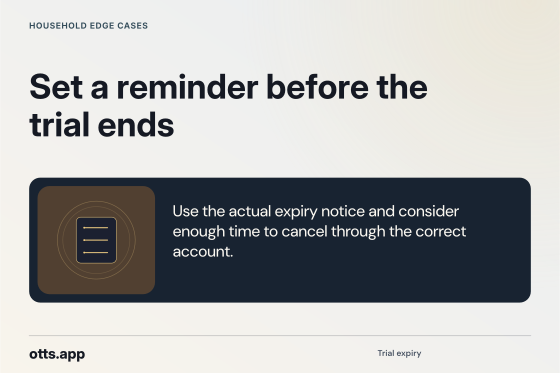
Use the actual expiry notice and consider enough time to cancel through the correct account.
Open original PNG
Provider price snapshot
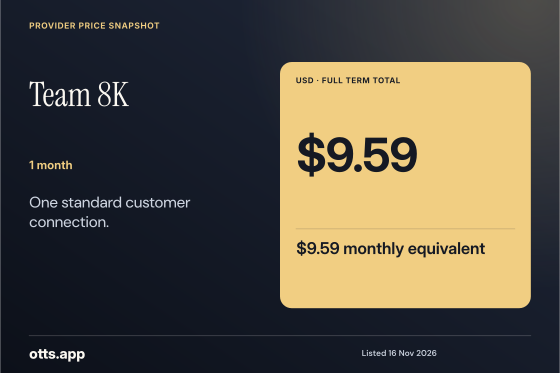
$9.59 USD for 1 month. $9.59 monthly equivalent. One standard customer connection. Published provider terms, checked 2026-11-16.
Open original PNG
Provider price snapshot
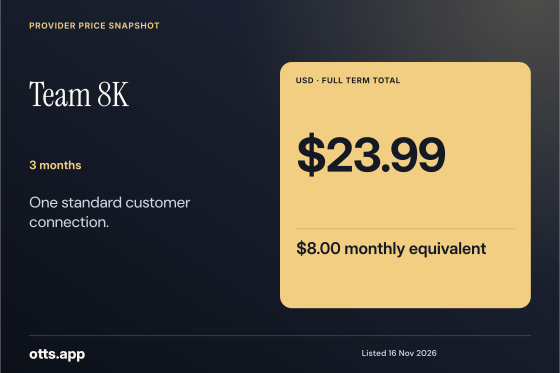
$23.99 USD for 3 months. $8.00 monthly equivalent. One standard customer connection. Published provider terms, checked 2026-11-16.
Open original PNG
Provider price snapshot
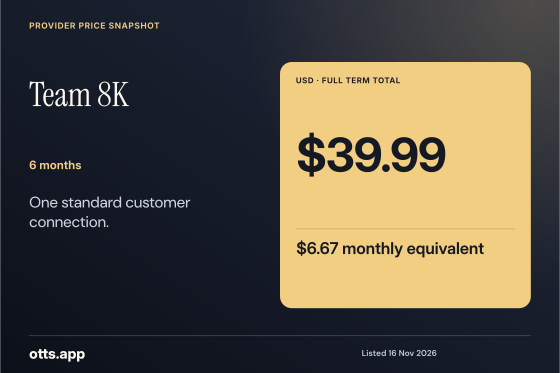
$39.99 USD for 6 months. $6.67 monthly equivalent. One standard customer connection. Published provider terms, checked 2026-11-16.
Open original PNG
Provider price snapshot
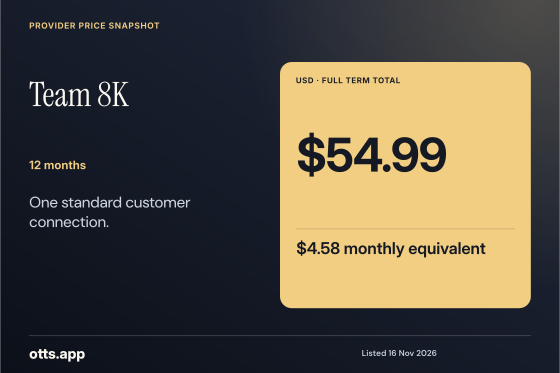
$54.99 USD for 12 months. $4.58 monthly equivalent. One standard customer connection. Published provider terms, checked 2026-11-16.
Open original PNG
Provider price snapshot
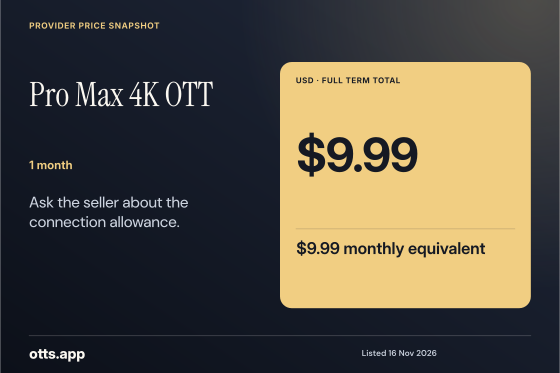
$9.99 USD for 1 month. $9.99 monthly equivalent. Ask the seller about the connection allowance. Published provider terms, checked 2026-11-16.
Open original PNG
Provider price snapshot
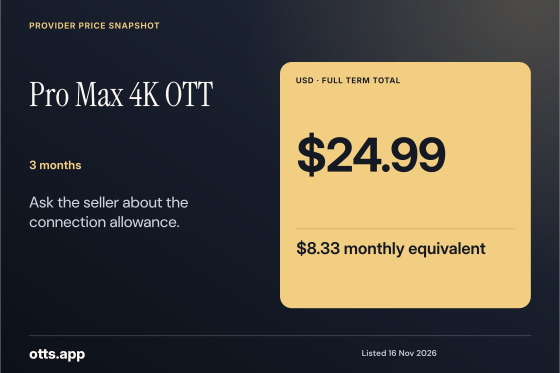
$24.99 USD for 3 months. $8.33 monthly equivalent. Ask the seller about the connection allowance. Published provider terms, checked 2026-11-16.
Open original PNG
Provider price snapshot
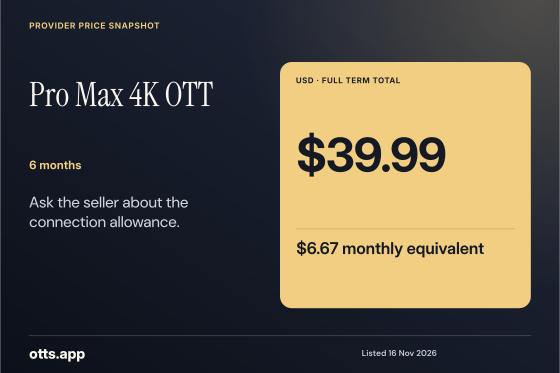
$39.99 USD for 6 months. $6.67 monthly equivalent. Ask the seller about the connection allowance. Published provider terms, checked 2026-11-16.
Open original PNG
Provider price snapshot
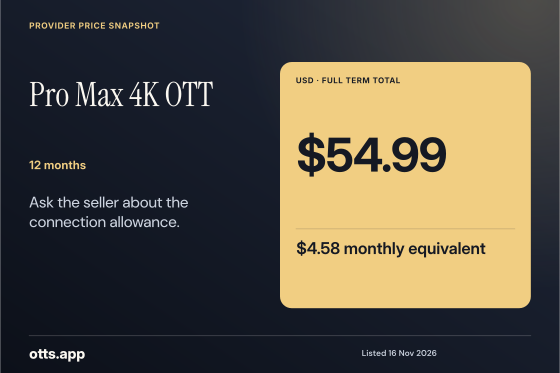
$54.99 USD for 12 months. $4.58 monthly equivalent. Ask the seller about the connection allowance. Published provider terms, checked 2026-11-16.
Open original PNG